Imagine you’re filling out an urgent medical form or navigating a new workplace software. A message flashes on the screen: “Please correct the fields highlighted in red.” You scan the page, but to your eyes, every box looks identical in a sea of muted tan and grey. For roughly 1 in 12 Canadian men and 1 in 200 women, this isn’t just a minor glitch, it’s a frequent, frustrating barrier.
While we often think of colour blindness as a simple inability to see “red” or “green,” it is more accurately a breakdown in how the world communicates. In a society that relies heavily on colour-coded data, maps, and interfaces, over 1.5 million Canadians are forced to navigate a world where the most important instructions are sometimes invisible.
The Science of the Cone
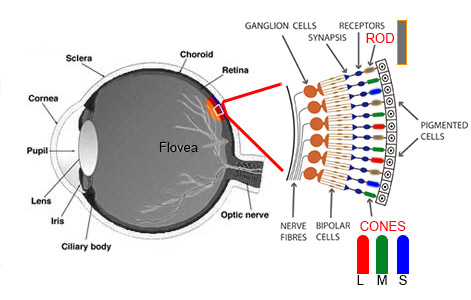
At the back of the human eye sits the retina, home to specialized cells called cones. In a typical eye, three types of cones work in harmony to sense red, green, and blue light. Colour blindness occurs when one or more of these cone types are either missing or, more commonly, when their sensitivity “overlaps” too much.
Because the genes responsible for red-green colour blindness are located on the X chromosome, the condition disproportionately affects those assigned male at birth. While women can be carriers, they rarely manifest the condition unless both X chromosomes carry the trait. Beyond genetics, colour blindness can also be acquired later in life through conditions like glaucoma, diabetes, or even as a side effect of certain long-term medications like Plaquenil.
More Than a Crayon Label: Life on the Spectrum
The most common form is Deuteranomaly, where green light shifts toward red, making the two colors appear muddy. More rare is Tritanopia, which affects the ability to tell blue from green. In the rarest cases, known as Achromatopsia, a person sees no color at all, navigating a world rendered entirely in shades of gray.
For many, the limitations are subtle but constant. In the classroom, a child might struggle with color-coded maps or lose interest in art when they can’t find the “right” crayon. In adulthood, the hurdles become structural. Many career paths in Canada—such as becoming a commercial pilot, an electrician, or certain roles within the RCMP—have strict color-vision requirements for safety. Even the simple act of cooking a steak to “medium-rare” or checking if fruit is ripe becomes a game of texture and guesswork.
Watch the video below from the Canadian Association of Optometrists for an in-depth explanation of colour blindness.
Tech or Transformation?
While there is currently no medical cure for congenital colour blindness, the market for assistive technology has exploded. Companies like EnChroma and Pilestone offer specialized glasses that use high-tech optical filters to “notch out” overlapping wavelengths of light.
The reviews for these products which cost anywhere from $100 to $450 CAD are famously polarized. Some users experience an emotional “viral moment” where colours “pop” for the first time. Others find the effect underwhelming or notice only a slight tint. It is important to note that these glasses do not “fix” the eyes; they simply enhance contrast and require natural sunlight to work effectively.
The Digital Accessibility Toolbox
For many Canadians, the most effective tools for navigating a world of colour aren’t sitting on a shelf in a specialty store—they are already in their pockets and on their desks. While colour-correcting glasses often grab the headlines, “invisible” software features built into our phones, laptops, and even TVs are the real workhorses of daily accessibility.
Here is how you can unlock the accessibility potential in the tech you already own.
Apple: The Gold Standard of On-Device Support
Apple has long integrated colour-blindness tools across iPhones, iPads, and Macs.
- System-Wide Colour Filters: Found under Settings > Accessibility > Display & Text Size, these filters don’t just “change colours”—they shift specific problematic wavelengths into a visible range. You can choose presets for Protanopia, Deuteranopia, or Tritanopia and even adjust the intensity to find your perfect balance.
- Differentiate Without Colour: This is a game-changer for digital forms. When enabled, it forces the system to use shapes or text instead of just colour. For example, a red “error” circle might become a square, and a green “success” circle might become a checkmark.
- The Magnifier “Detect” Mode: The built-in Magnifier app can act as a live set of eyes. It can identify colours in real-time or apply high-contrast filters to help you read a confusing transit map or see the difference between a ripe and unripe piece of fruit.
Windows and ChromeOS: Designing for the Desktop
For those working in office environments where spreadsheets and data-heavy charts are common, Windows and Chromebooks offer built-in relief.
- Windows Colour Filters: In Windows 11, pressing Win + Ctrl + C can instantly toggle colour filters on and off once they are set up in the Accessibility menu. This allows a user to “dip in” to a filtered view to check a spreadsheet and then return to standard colors for other tasks.
- Contrast Themes: Beyond color filters, Windows offers “Contrast Themes” that remove distracting background elements and use high-contrast outlines to make buttons and text fields pop—essential for those who struggle with the “faint gray on white” design of modern websites.
- Chrome Browser Extensions: If you use Google Chrome, the “Colour Enhancer” extension allows you to perform a custom “calibration” test. It then adjusts the colors of every website you visit to match your specific vision profile.
Android: Customization and Shortcuts
Android devices (like Samsung, Pixel, and Motorola) offer some of the most flexible “shortcut” options for color correction.
- Quick Toggle: You can add a “Colour Correction” button directly to your Quick Settings tray (the menu you swipe down from the top). This lets you turn on your specific filter (Deuteranomy, etc.) only when you need it, such as when looking at a colour-coded legend in a PDF.
- Samsung’s “SeeColours” Mode: Samsung has expanded its accessibility to the living room. Many of their latest Smart TVs and monitors include the SeeColours mode, which allows users to take a vision test directly on the screen. The TV then recalibrates its entire output to ensure the user sees a richer, more accurate range of colours while watching movies or sports.
Why Built-In Tech Wins
Unlike specialized glasses, these digital tools have three major advantages:
Accuracy: Because they work at the software level, they can clarify digital interfaces such as that “highlighted in red” form field in a way that glasses often cannot.
Zero Cost: They are already included in the price of your device.
Adjustability: Unlike a physical lens, you can change the intensity of a digital filter depending on whether you’re in a dark room or bright sunlight.
Ultimately, colour blindness is a reminder that no two people see the world in exactly the same way. As we become more aware of sensory differences, the world is slowly shifting. From transit maps that use patterns to inclusive web design, the world is becoming more navigable for the 1.5 million Canadians who see it just a little differently.
Subscribe to The Health Insider for ongoing health optimization tips.
~ Read more from The Health Insider ~
- 6 Foods That Help You Poop and Why They Actually Work
 Can’t go? These 6 simple foods may help ease constipation and support more regular digestion, no harsh fixes needed.
 - Why Top Surgeons Are Trading Caffeine for CreatineIt’s not just for the gym. See why your brain is a “metabolic furnace” that uses creatine to prevent fog and fatigue.
- Could ADHD Awareness Lead to False Self-Diagnosis? Researchers Explore the Nocebo EffectA study finds ADHD awareness may increase false self-diagnosis in young adults, with researchers pointing to the nocebo effect.
- Post-Finasteride Syndrome: Risk of Hair Loss TreatmentFor some, stopping Finasteride is just the beginning. Explore the “crash,” the neurological impact, and why Health Canada is issuing new warnings.
- Colorectal Cancer Rising in Younger Adults: Experts Urge Screening at 45The Canadian Cancer Society urges governments to lower the colorectal cancer screening age to 45 as diagnoses continue rising among Canadians under 50.
- GLP-1s and Bone Health: Potential Risks for Non-DiabeticsNew studies reveal a 22% higher osteoporosis risk for non-diabetics on GLP-1s. Learn how these weight-loss drugs may impact your skeletal strength.






Over 1.5 million Canadians live with color blindness. Discover the science, daily challenges, and the high-tech tools changing how they see.